How to Log In to Your Learning Hub Account
Learning Hub is Siteimprove's learning and education platform. To login, you must have a Siteimprove Platform account, provided by your organization's account owner or account admin.
Follow these instructions to access your Learning Hub account:
- Go to the Siteimprove platform and log in using your current username and password
- Navigate to the “Help Center and training” dropdown, indicated by the question mark icon, on the top right corner.
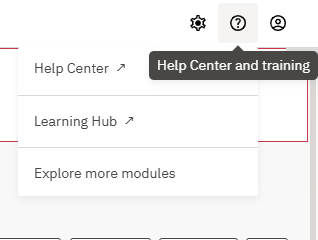
- Select “Learning Hub” to open the Learning Hub in another tab.
- You will then be automatically logged in via Single sign-on (SSO).
Note: After you initially log in to the Learning Hub using this process, you can then log in to the Learning Hub directly by going to the Learning Hub site.
To find more about your organization's access to Learning Hub, please contact your CSE.
If you have any additional questions regarding access to your Learning Hub account, please email LearningHub@siteimprove.com.
Did you find it helpful? Yes No
Send feedbackSorry we couldn't be helpful. Help us improve this article with your feedback.