How to Delete or Deactivate a Policy
Summary
To remove or pause a policy you're no longer using, delete it permanently from My Policies, or deactivate it to stop it from running while keeping the option to reactivate it later.
Applies To (Environment)
- Product / Service: Siteimprove Policy
- Version: N/A
- Platform / OS / Browser: Siteimprove web platform
- User role / permissions: Policy management access
- Preconditions: A policy has already been created
Overview
Once a policy has been created you have the option to either delete or deactivate policies that you are not currently using.
Procedure (Steps)
Deleting a Policy
- Select Policy from the main menu.
- Click My Policies from the side-bar menu.
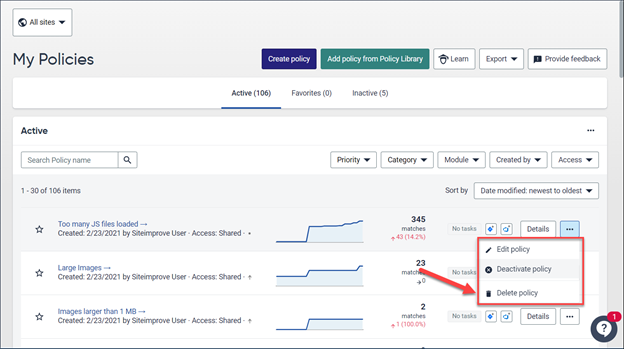
- From the list of Policies, find the policy you wish to delete and select the options icon on the right of the table for that policy.
- Select Delete Policy from the options presented.
Deactivate a Policy
- Select Policy from the main menu.
- Click My Policies from the side-bar menu.
- From the list of Policies, find the policy you wish to deactivate and select the options icon on the right of the table for that policy.
- Select Deactivate Policy from the options presented.
Expected Result
- Deleting a Policy: The policy is permanently removed from your policy list.
- Deactivating a Policy: The policy is moved to the Inactive table on the My Policies page. Inactive policies do not run unless you reactivate them. Reactivating a policy starts a new run and places it back on the Active table.
Did you find it helpful? Yes No
Send feedbackSorry we couldn't be helpful. Help us improve this article with your feedback.