How to set a Site Target
Summary
Define a Site Target by selecting WCAG conformance levels, best practices, issue types, and scoring criteria, then saving your configuration on the Site Target page.
Overview
This article explains how to configure a Site Target in Siteimprove, including the available options for WCAG conformance, best practices, issue types, and scoring. It also provides context on how the DCI score is calculated.
Before you begin
- Access to the Siteimprove platform
- Permissions to configure Accessibility settings
Steps
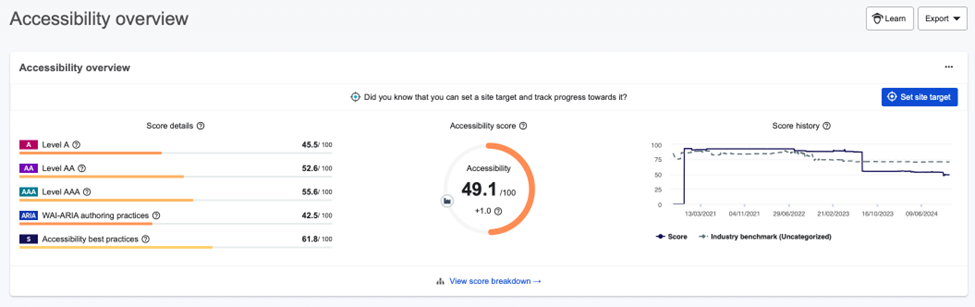
- Click on the Set Site Target button which will open the Site Target configuration page.
- There are the following options to select for your target:
- WCAG Conformance: Levels A, AA, and AAA
- Best Practices: ARIA, Siteimprove
- Issue Type: Issues, Potential Issues
- Score Type: Site target as a point on the Accessibility score, Accessibility site target score
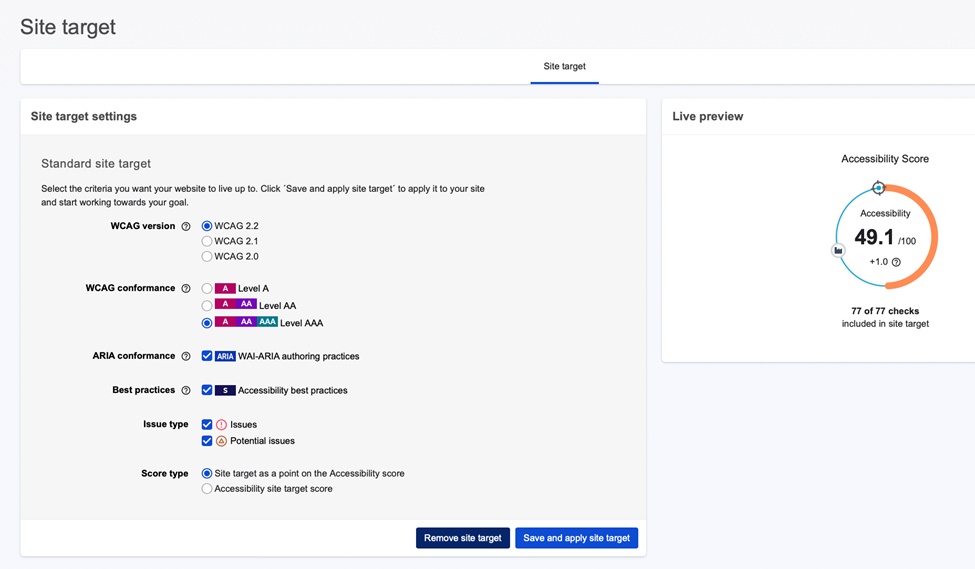
- Choose your options and select “Cancel” or “Save”.
Additional information
Note: In Accessibility, the DCI score is now comprised of 90 points awarded for WCAG conformance (Levels A, AA, and AAA), with the remaining 10 points gained for the use of accessibility best practices.
Did you find it helpful? Yes No
Send feedbackSorry we couldn't be helpful. Help us improve this article with your feedback.