How to Create and Manage UTM Presets in Siteimprove Analytics
Summary
To create and manage UTM presets, go to Analytics → Campaigns → UTM Presets and add source presets, medium presets, or source/medium pairs.
Overview
Here you can view and add Source Presets, Medium Presets and Source/Medium Preset Groups and pairs.
Steps
Add a Source Preset
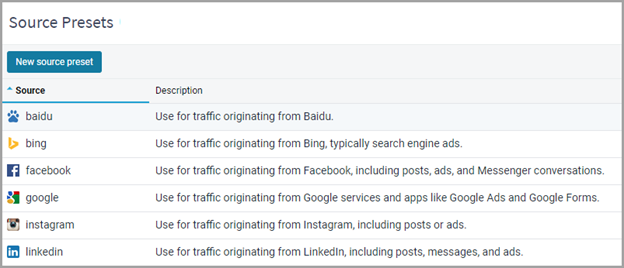
- Click on ‘New source preset’ and give your new source a name and description.
Add a Medium Preset
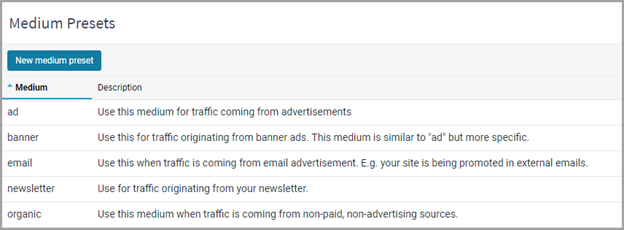
- Click on ‘New medium preset’ and give the new medium a name and description.
Add a Source/Medium Pair
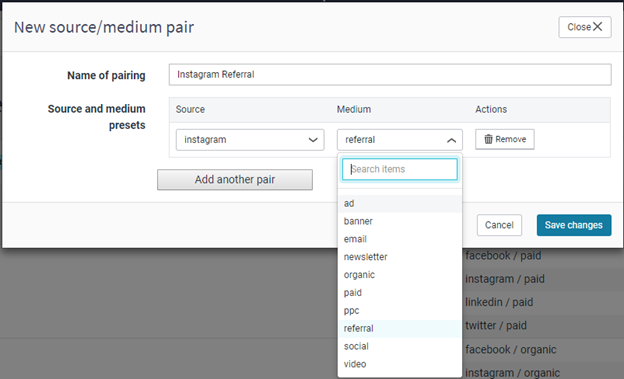
- Click on ‘New source/medium pair’ and select the source and medium combinations from the drop-downs.
Notes
- You can add multiple source/medium pairs under the same pairing name – so you can quickly create numerous UTM links.
Expected Result
- Presets are saved and available for use
- These presets can be used to quickly create UTM links for future campaigns
Additional Context
You can build UTM links during the campaign creation workflow or using the UTM link builder feature independently.
For further information on Campaigns, see How do I monitor a Campaign using Siteimprove?
Did you find it helpful? Yes No
Send feedbackSorry we couldn't be helpful. Help us improve this article with your feedback.