How to Turn on Struggle Detection
Summary
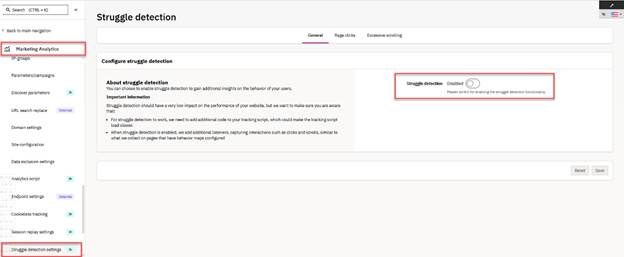
To enable Struggle Detection, navigate to the Struggle detection settings in Analytics and toggle the Struggle Detection switch.
Prerequisites
- A configured Siteimprove Analytics account
Steps
- Go to Marketing Analytics > Analytics > Tracking > Struggle detection settings.
- Enable Struggle Detection by clicking on the Struggle Detection switch.
Result
Struggle Detection is enabled and will begin monitoring user behavior such as clicks and scrolling.
Related concept
To understand how this feature works, see: What is Struggle Detection?
Did you find it helpful? Yes No
Send feedbackSorry we couldn't be helpful. Help us improve this article with your feedback.