How to Find a Group ID
Summary
A Group ID is the identification number for a specific group in Siteimprove. You can find it in Settings or in Analytics by locating the ID in the URL.
Prerequisites
- Access to Siteimprove
- Permission to view groups
Group ID
Group ID is the identification number for a specific group. Siteimprove uses both Content (e.g. QA, Accessibility, Policy) and Analytics groups.
Content Group ID
To find a Content Group ID, go to Settings > Groups, then select the Group you would like the ID for.
The number shown in the URL after the parameter ‘groupId=’ is the ID for the selected group.
Analytics Group ID
This is the Group ID used, for example, when using the Tableau or Power BI integrations.
Go to Analytics > Analytics Overview.
Select the Group for which you need the Group ID in the dropdown on the top of the page.
The Group ID is then presented in the URL of your browser.
To make sure you are looking at the Group ID, select a different Group to see the Group ID changes respectively. In this example URL given below, the Group ID is 999.
https://my2.siteimprove.com/Analytics/444/999/Custom/Overview/Index
The image below shows the Analytics Overview page in the platform with the "Product" group selected. In this case, the URL again shows the Group ID of 999.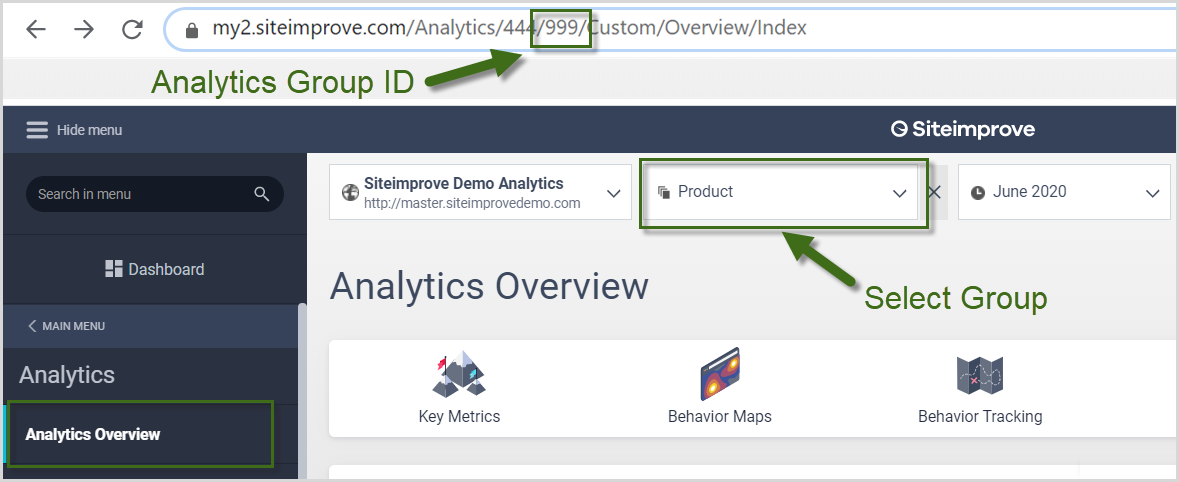
Did you find it helpful? Yes No
Send feedback