What checks are available in Prepublish checks?
Answer
The checks available depend on the Siteimprove features within your subscription, your CMS software, and the Integration that utilizes the Prepublish feature. Generally, Prepublish checks are available across four categories: Quality Assurance, Accessibility, Policy, and SEO. These checks help identify content quality issues, accessibility concerns, policy violations, and SEO opportunities before content is published.
Overview
The checks available depend on the Siteimprove features within your subscription, your CMS software, and the Integration that utilizes the Prepublish feature.
Generally, the following checks are available.
Quality Assurance
Available checks
- Misspellings
- Potential Misspellings
- Language Detection
- Readability
- Email Addresses
- Link Text
- Meta Tags
- Trademarks
Accessibility
We provide our full suite of page-level checks at the Prepublish stage.
See: A Guide to the Siteimprove accessibility checks.
Policy
You can include any "Content" policies in your Prepublish checks, as long as the policies are marked in the Siteimprove Platform as:
- Enabled for all sites within the Siteimprove platform
- Shared
- Checked to display in the CMS plugin.
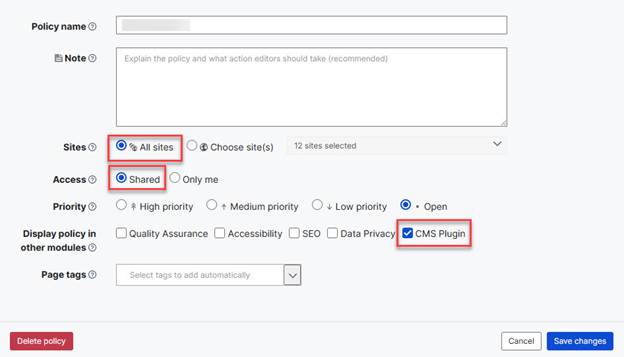
Note: The "High priority" designation is no longer required for policies to appear in the CMS plugin’s Prepublish and Live views. Also, "Media" and "Document" policies are not supported at this time.
SEO
Note: SEO checks are only available in the "Old plugin experience" and are in Beta mode within the "New plugin experience," but you can submit a ticket with the Customer Support Team to request access to these checks in Beta mode in the "New plugin experience."
SEO Technical Issues
- HTML validation errors
- Missing structured data markup
- Missing Open Graph tags
- Page-level nofollow tags
- Pages with noindex metatag
- Pages with frames or iFrames
SEO Content Issues
- Pages with low text-to-code ratio
- Empty meta descriptions
- Missing meta descriptions
- Pages with multiple meta descriptions
- Meta descriptions are too short
- Meta descriptions are too long
- Empty meta titles
- Pages with multiple meta titles
- Meta titles are too long
- Meta titles are too short
- Missing H1 tags
- Empty H1 tags
- Pages with multiple H1 headers
- Low content word count
SEO User Experience Issues
- Images missing alt attributes
Key Takeaways
- Available checks vary based on your subscription, CMS software, and integration.
- Quality Assurance checks help improve content accuracy and readability.
- Accessibility checks provide Siteimprove's full suite of page-level accessibility reviews.
- Content policies can be included when configured appropriately in the Siteimprove Platform.
- SEO checks cover technical, content, and user experience issues.
- SEO checks in the New plugin experience are currently available in Beta.
Related Articles
Did you find it helpful? Yes No
Send feedback