Manage Keywords in Siteimprove Ads
Summary
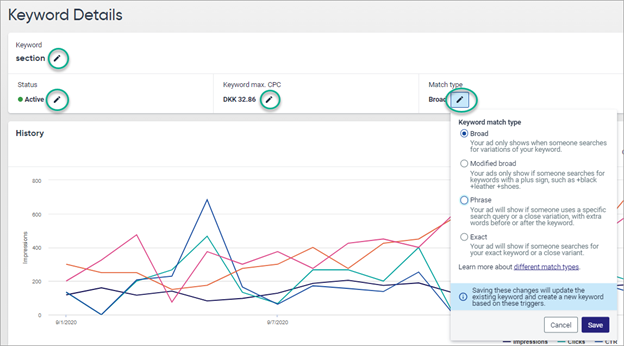
Use the Keyword Details page to change a keyword name, activate or pause a keyword, adjust its maximum cost per click, or change its match type.
Steps
- Go to Ads > Data Explorer > All Keywords.
- Select the relevant keyword to open Keyword Details.
- Select the edit icon next to the item you want to change.
- Make one of the available changes:
- Modify the keyword name.
- Activate or pause the keyword.
- Adjust the maximum cost per click.
- Change the match type.
- Apply the change.
Changes made through Siteimprove Ads are pushed to the connected Google Ads account.
Related Articles
Did you find it helpful? Yes No
Send feedbackSorry we couldn't be helpful. Help us improve this article with your feedback.