Review page content issues in the CMS plugin
Summary
Page Content Issues show page-specific content problems and can open the related page report issue or the relevant area in the Siteimprove Platform.
Overview
Use this article to understand which page-level content issues can appear in the CMS plugin and where users are taken when they select an issue. This helps users interpret the issue list before investigating items in the page report or Siteimprove Platform.
Page Content Issues
The page content issues tab displays content issues. If you select the issue, another browser tab will open to either the corresponding issue in the page report or the corresponding area in the Siteimprove Platform so you can investigate further.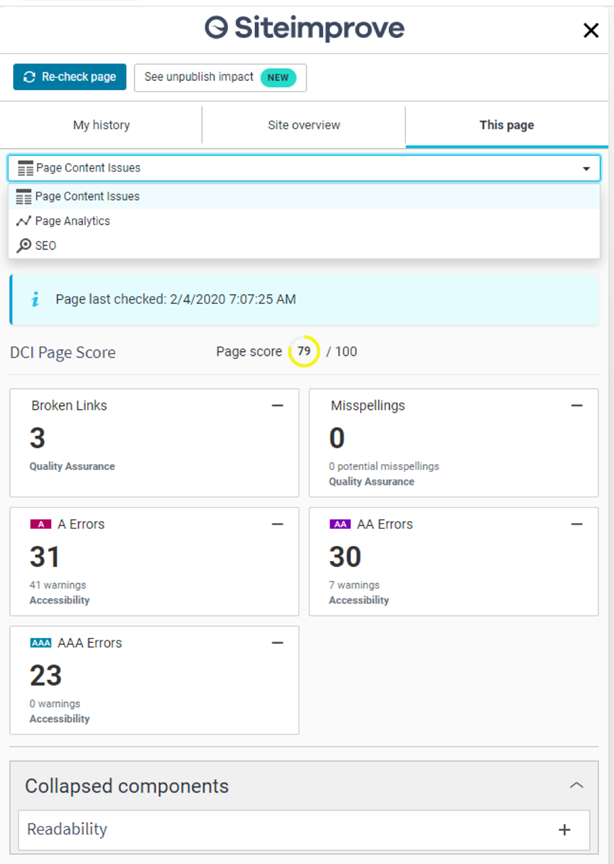
The Page Content Issues section shows data relating to the following:
- Page Last Checked Data
- DCI Page Score
- Quality Assurance
- Misspellings
- Broken links
- Readability levels
- Accessibility
- Accessibility issues (A, AA, AAA, WAI-ARIA authoring practices, and Accessibility best practices conformance levels)
- Policy - displays any "Content" type policies that are marked in the Siteimprove Platform as:
- Enabled for "all sites" under the account
- Shared
- Checked display in the CMS plugin
The "High priority" designation is no longer required for policies to appear in the CMS plugin’s Prepublish results and under the "This page" tab. "Media" and "Document" type policies are not supported currently.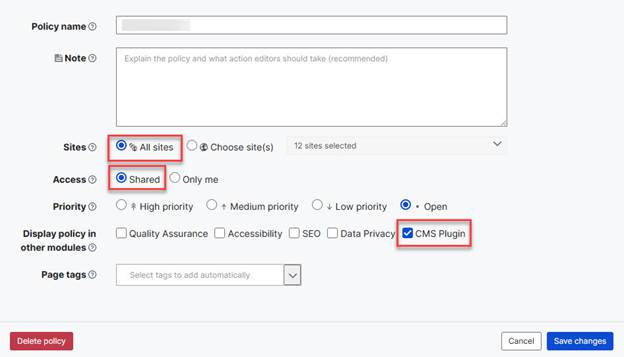
Policies must be enabled in the Siteimprove Platform to display in the plugin.
You can expand and collapse some data components. To collapse components, select the minus (-) sign next to the component. If components are collapsed, you should be able to find and select the plus (+) sign to expand them under the "Collapsed components" area.
Did you find it helpful? Yes No
Send feedback