Review SEO page details in the CMS plugin
Summary
SEO Page details display page-level SEO data when the user has a subscription and access to the SEO section in the Siteimprove Platform.
Overview
Use this article to understand what SEO information can appear for a page in the CMS plugin. This helps users interpret page-level SEO data and know why some issue links open to broader SEO issue pages in the Siteimprove Platform.
SEO Page details
The SEO page details will display SEO data if you have a subscription and access to the SEO section in the Siteimprove Platform.
The SEO section gives details on the following:
- Page Last Checked Data
- SEO Score
- SEO Technical issues
- SEO Content issues
- SEO User Experience issues
- SEO Search snippet preview
- SEO Keywords related to this page
- SEO Competing content
If you click on issues under the SEO section, another browser tab will open to the overall SEO issue page in the Siteimprove platform. It doesn’t open to the specific page report directly for the issue as many SEO issues are overall sitewide issues or may not be highlightable on the page report.
You can expand and collapse some of the different data components listed. To collapse components select the minus (-) sign next to the component. If components are collapsed, you should be able to find and select the plus (+) sign to expand them under the Collapsed components area.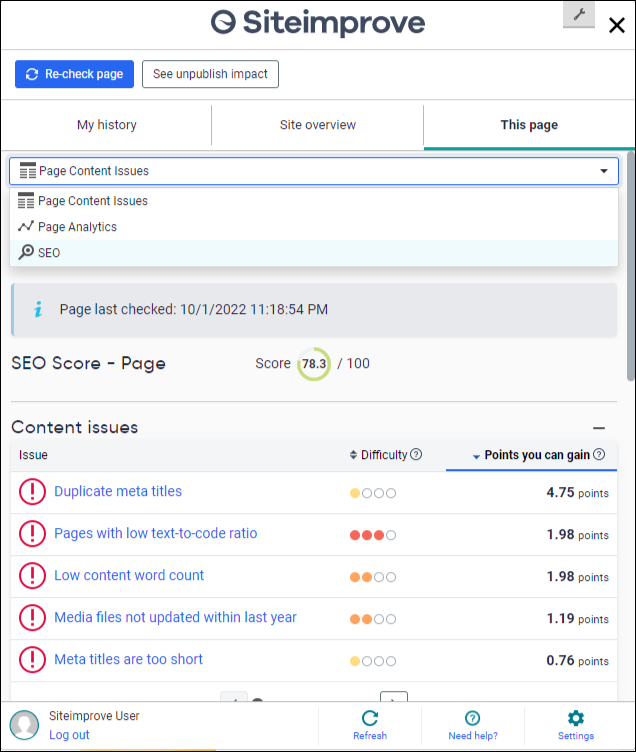
Related articles
Did you find it helpful? Yes No
Send feedback