Find Siteimprove IDs and parameters for Power BI
Summary
This article explains how to find the identifiers needed for data queries and choose a reporting period. It guides users to the relevant lookup locations and clarifies supported date options and time-range restrictions.
site_id
site_id - this is the "Global Site ID" of the site that can be seen in parentheses next to the URL for the site under the Site folders. For example, in the screenshot below, where it says https://www.siteimprove.com/ (28268539130), the number “28268539130” is the site_id. You can also look these IDs up under General > Get sites. 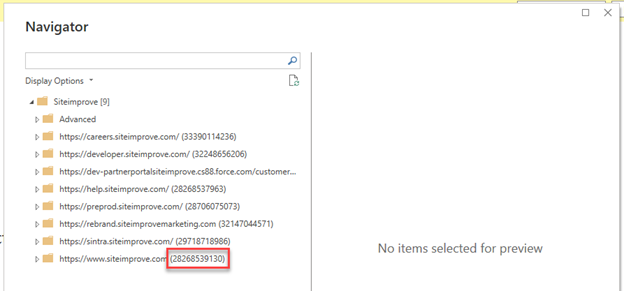
group_id
group_id - the Content or Quality Assurance "group_ids" can be found under Quality Assurance > Get quality assurance groups. Analytics group IDs can be found under Analytics > Get Analytics groups.
page_id
page_id - you can find this under Quality Assurance > Get pages from inventory. Also, this is under page reports in the platform in the page report URLs after the parameter “?PageId=” or “?pageId=”.
In the URL below, the page ID is 4700037447: Accessibility Page Report Overview 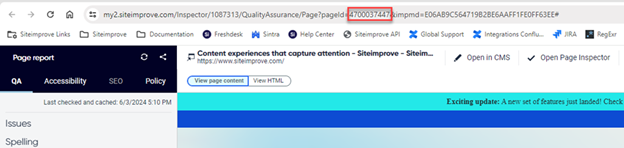
filter_id
filter_id - this can be found under Analytics > Get available segments under the sites.
period
period - the default time range is the last 7 days. You can set this to a different time period under the "Advanced" area folder of data points under the Power BI connector. A time period can be a single date, a date range, or a predefined interval. Only full dates are allowed, not individual hours. It is recommended not to query too long of a time period as you may run into loading issues. Instead, you can query each month and add them up once the data is queried.
- Single date – just fill in "period Start Date"
- Range of dates – Fill in both "period Start Date" and "period End Date."
- Predefined interval - can be one of the following (case insensitive) - these intervals align with the intervals in the platform.
- now
- today
- yesterday
- last_seven_days
- last_week
- last_fourteen_days
- last_month
- this_month
- last_thirty_days
- last_six_months
- this_quarter
- last_year
- this_year
- last_365_days
Did you find it helpful? Yes No
Send feedback