Power BI Connector FAQs and Troubleshooting
Summary
This article explains how to identify connector data areas, find available data points, and gather Analytics data in smaller timeframes. It also provides troubleshooting guidance for a missing “Get history” endpoint and “Get DCI scores” displaying [Record] instead of scores.
Reference
Connector data areas
"A11YNextGen" is the Next Gen Accessibility data points, and if you can see this area under the connector, you are using the latest connector. The ‘Accessibility’ area is the old Accessibility data.
The "Content" area is to be used only for Prepublish checks, AKA Content Checks.
Finding data points in Navigator and the API
Typically, if you are looking for data that you can see in the platform, it will be named something similar in the connector.
You can search for data points using the search box in the "Navigator" window. You need to expand the folders to search under them, though.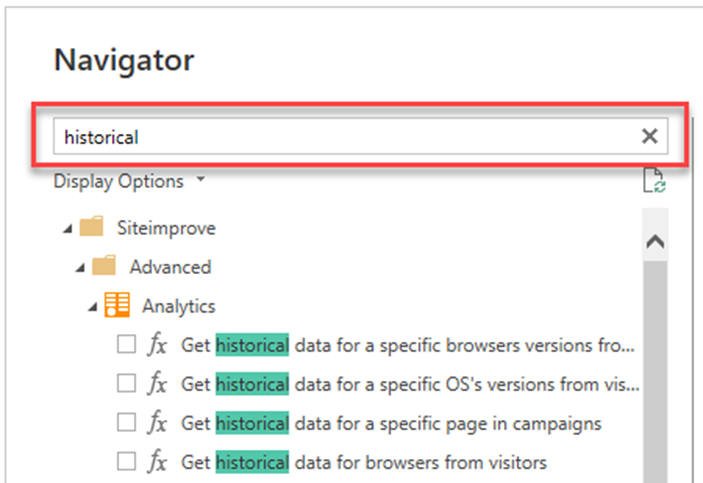
We don't currently have a full list of available data points, but you should be able to look at our API, and generally, if the data is in the API, it should be in the connector. See more on how to connect to the API here: How to Connect to the Siteimprove API.
API usage guidelines and Analytics timeframes
Most of the limitations and usage guidelines for data are similar to the API, which are listed here: Siteimprove API Usage Guidelines page.
It is recommended for Analytics data to gather data in smaller chunks for timeframes, and then gather the data together after the data is fetched.
Troubleshooting
Missing “Get history” endpoint
If you are not seeing the “Get history” endpoint, you may need to go under Documents\Power Bi Desktop\Custom Connectors, or just search “Custom Connectors” under File Explorer, and remove the ‘Siteimprove.mez’ file from under the "Custom Connectors" folder. You will need to restart Power BI to see if that helps or not. If it helped, you should see data for the "Get history" endpoint.
“Get DCI scores” displays [Record]
If you are having issues with the "Get DCI scores" data point showing [Record] instead of the DCI scores, you will need to ensure you are using the latest version of the package file.
Did you find it helpful? Yes No
Send feedback