Understanding your AI Visibility Score
Summary
Your AI Visibility Score is a single 0–100 number that shows how often AI assistants name and recommend your brand compared with your competitors, with 50 marking a typical competitor. It matters because it gives you one figure to track your brand's standing in AI search over time, right next to your SEO score.
Overview
Your AI Visibility Score shows, in a single number, how often AI assistants name and recommend your brand when people ask them for advice. Just as importantly, it tells you whether that's more or less often than your competitors. You'll find it on the SEO overview page, right next to your SEO score, if AEO is part of your Siteimprove subscription.
Think of it as the AI-search counterpart to your SEO score: one figure you can track over time, compare against competitors, and share with your team. This article walks through what feeds the score, how to read each part of the card, and where to go when you want to move it.
AEO features, including the AI Visibility Score, require a subscription to one of our three Search packages:
Search Essential
Search Pro
Search Advanced
What this means
What the score measures, and what it doesn't
The score looks at one thing: how your brand comes up when AI assistants answer the questions people in your market ask them. Those questions are the ones tracked in Advanced AEO Insights, and every AI answer to them is a sample of what AI tells real people.
Three rules keep the number fair:
- Only the last four weeks count. The window rolls forward with each check, so older answers drop out over time and the score reflects where you stand now.
- Leading questions are left out. A question that names you or one of your tracked competitors would tip the answer, so it's excluded. The score is only as fair as the questions behind it.
- You're measured against your competitors, never on your own. Every part of the score compares you with the competitors you track, so the number says where you stand rather than simply how often you appear.
It also helps to know what the score doesn't cover. It isn't a measure of your whole site. It doesn't look at individual pages, your SEO issues, or how you rank in traditional search results. It's about your brand in AI answers, full stop.
A tour of the card
The card has five parts, numbered in the image below.
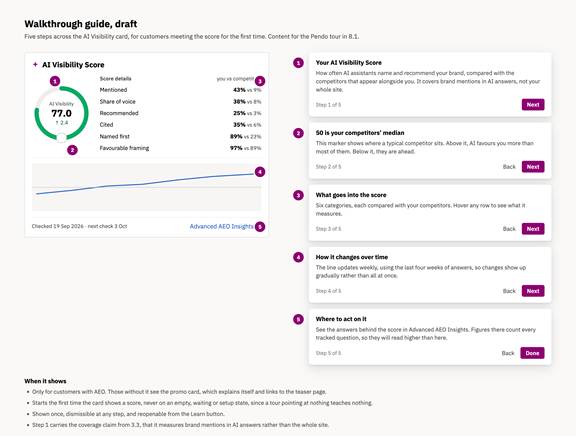
The AI Visibility Score card, with the five parts numbered and the walkthrough text for each step. Example figures.
- The score. The large number is your AI Visibility Score, from 0 to 100. The arrow and small figure beneath it show how far the score has moved since the last check, so you can see the direction of travel at a glance.
- The 50 marker. The small circle on the gauge marks 50, your competitors' median. That's where a typical competitor sits. Above it, AI assistants favour you more than most of them. Below it, they're ahead.
- Score details. Six categories, each shown as you versus your competitors. Hover over any row to see what it measures. These are the ingredients of the score, and the next section goes through them one by one.
- The trend line. This shows how your score has moved over time. It updates weekly, using the last four weeks of answers, so changes show up gradually rather than all at once.
- Dates and the way in. The footer tells you when the score was last checked and when the next check is due. The Advanced AEO Insights link takes you to the answers behind the score.
The first time the card shows a score, a short walkthrough points out these five parts. You can dismiss it at any step and reopen it later from the Learn button.
What goes into the score
Every AI answer is read for six things. Each one asks a simple question about the answer, and together they make up the six rows in the score details. They're listed here in the order they appear on the card.
- Category: Mentioned
- The question it answers: Does the AI name you?
- What counts: The share of answers that name your brand at all.
- Category: Share of voice
- The question it answers: How big is your slice of the conversation?
- What counts: Your mentions out of all brand mentions across the answers.
- Category: Recommended
- The question it answers: Does the AI tell people to pick you?
- What counts: Answers that actually recommend you. Appearing in a plain list doesn't count.
- Category: Cited
- The question it answers: Does the AI link to your site as a source?
- What counts: The share of answers that cite your website, whether or not they name you.
- Category: Named first
- The question it answers: When you're named, are you named first?
- What counts: Of the answers that name you, how often you come before every tracked competitor.
- Category: Favorable framing
- The question it answers: Does the AI speak well of you?
- What counts: Each answer gets one verdict: more good than bad, more bad than good, or even.
Each row shows two figures: yours, then a typical competitor's. In the example card above, the brand is mentioned in 43% of answers while the typical competitor sits at 9%. It's the gap between the two that matters, not your figure on its own. Being named in 60 out of 100 answers is excellent if your competitors manage 10, and poor if they manage 90.
Who is impacted by this
The AI Visibility Score is for teams with AEO in their Siteimprove subscription who want to track, compare and share how AI assistants present their brand against the competitors they follow.
How it works
How the score changes over time
The score is checked weekly, and each check uses the last four weeks of answers. Three of those weeks overlap with the previous check, so a shift in what AI assistants say shows up gradually over several checks rather than all at once. That's deliberate: the score is meant to show a direction of travel, not react to one unusual week.
The small arrow and figure under the score show how far it moved since the last check. The trend line below the score details shows the longer run, and the footer tells you when the score was last checked and when the next check is due.
Alongside the number you'll see a confidence label: Provisional, Low or High. A score built from five answers looks just as precise as one built from 500, and the label is what tells them apart. Provisional means it's too early to say, for instance while fewer than 30 answers sit behind the score. Low means a rough guess, with more data behind it but still fewer than 120 answers. High means there's enough data to take the number at face value.
If your score sits close to 50 in the first weeks, that's the steadying at work, not a verdict on your brand. With few answers, every category is pulled towards the midpoint until enough data builds up. Give it a few checks before reading too much into the number.
Where to act on it
The card tells you where you stand. The answers behind it live in Advanced AEO Insights, which you can open from the link in the card footer or from the left navigation. That's where you can read what AI assistants actually said, question by question, see which competitors appear alongside you, and follow how you're framed.
A good place to start is the score details. Look for the row where the gap between you and your competitors is widest, or the one that moved since the last check. Each category points somewhere different:
- A healthy Mentioned figure with a low Recommended one means AI assistants know who you are but aren't telling people to choose you.
- A low Share of voice means competitors are taking up more of the conversation, even when you're mentioned.
- A low Cited figure means AI assistants rarely use your website as a source for their answers.
- A low Favourable framing figure means you're being mentioned, but not in the way you'd like.
Then open Advanced AEO Insights and read the answers to the questions behind that row.
One thing to expect when you get there: the figures in Advanced AEO Insights read higher than the ones on the card, and they won't match the score exactly. They count every tracked question, including the leading ones that name a brand and that the score leaves out, and the visibility figures there are calculated in their own way. The two aren't in conflict. Use the score to see where you stand and whether it's improving, and use Advanced AEO Insights to dig into why.
Common misunderstandings
Common questions
I have AEO, but the card doesn't show a score yet. Why?
The score needs its first check to complete, and if you're new to AEO, your questions and competitors need to be in place before that can happen. In the meantime the card tells you what it's waiting for and when to expect the first score. A card without a number never means zero visibility. It means not measured yet.
Does the score cover my whole website?
No. It covers how your brand appears in AI answers to the tracked questions. It doesn't look at your pages, your SEO issues or your search rankings.
Why is my score so close to 50 when we've only just started?
With only a few answers behind it, every category is pulled towards the midpoint so that a lucky week can't look like a breakthrough. The confidence label will say Provisional while that's the case. As answers build up over the following checks, the score settles where it belongs.
One of the rows shows no data. Is something wrong?
No. A category shows no data when it can't be measured yet, for example when no competitor appears in the answers, or when answers are still being classified. The score leaves that category out and the other five share its weight, so you still get a number.
Can the score reach 100?
In practice, no. Every category is a head-to-head with a typical competitor, and small samples are steadied, so the extremes are rare. A brand named in every one of 100 answers while the middle competitor is never named still lands around 88 on that category. Treat a score well above 50 as a strong lead, not a shortfall from 100.
I don't have AEO. What do I see?
You'll see a card that explains what the AI Visibility Score is and links to more information about AEO. Once AEO is part of your subscription, the card shows your score after its first check.
What this article does not cover
This article explains what the AI Visibility Score means and how to read it. It does not cover step-by-step ways to improve your score, how to set up tracked questions and competitors, or troubleshooting site-specific issues.
Did you find it helpful? Yes No
Send feedback