What is the Siteimprove QA Inventory?
Summary
The Quality Assurance (QA) Inventory is a tool with which you can review your site's content. It contains an index of assets the QA scan has found on your site. It provides you with a content audit that can be exported and shared with other team members.
Overview
The Quality Assurance (QA) Inventory is a tool with which you can review your site's content. It contains an index of assets the QA scan has found on your site. It provides you with a content audit that can be exported and shared with other team members.
The Inventory can be found at Quality Assurance > Inventory.
Key Features
Inventory Summary
The Inventory Summary provides an overview of how your content has changed over time with each crawl. It can be filtered by page group to help you investigate the data that's important to you. 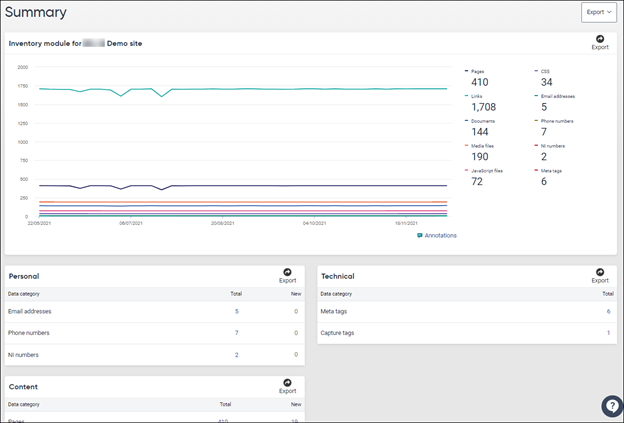
Pages
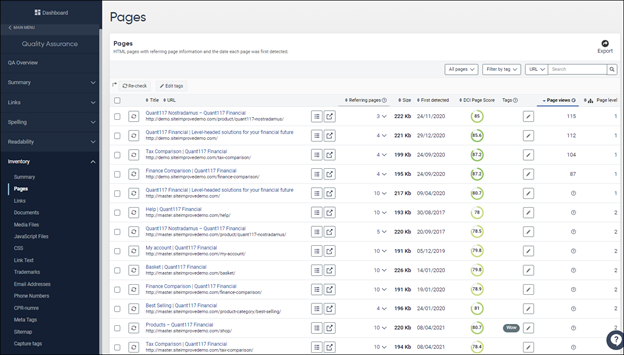
Under the pages menu, we show information on the pages found on your site including:
- The number of referring pages there are for each page.
- If CMS Deep linking is configured, the option to open the page in your CMS.
- First detected date - gives you an idea of how long the page has been on the site, and whether it may be outdated content.
- The individual DCI score per page gives you an idea of the content quality. See also: What is the Digital Certainty Index® (DCI®)?.
- If Priority data has been implemented, you can see the number of page views over a rolling 30-day period.
- The Page inspector gives an overview of the content on a single page including issues, referring pages, and the shortest path that users can take to get to this page. See What is the Siteimprove QA Page Inspector?.
Links
We give details on the links found on your site including options to:
- View and filter by link HTTP status – The is very useful when migrating data and for redesign preparation.
- Filter links by age (e.g., newly captured in the crawl since the last crawl, last week, or last month).
- View the number of clicks on a link. (Requires Priority data to be implemented).
Documents
Here you are given a breakdown of your internal and external documents (PDF, Excel, etc.) which includes:
- Document size provides the file size of the document in bytes.
- The Number of clicks the document received is shown if priority data is enabled.
- Referring pages where these links were found across the site.
Media Files
The Media files section of the Quality Assurance Inventory includes the following categories:
- Audio
- Images
- Video
- Flash
- Java Applets.
For a list of the file types included, see: What media file types are included in QA Inventory?.
Sitemap
- Quickly understand the hierarchy of your site content, and get a high-level view of the areas of the site we are capturing in the crawl today.
- Easily create groups to help you filter your site data for reporting. See: How do I create a group using the Siteimprove sitemap?.
Related Concepts
Digital Certainty Index (DCI)
The individual DCI score per page gives you an idea of the content quality.
QA Page Inspector
The Page inspector gives an overview of the content on a single page including issues, referring pages, and the shortest path that users can take to get to this page.
Priority Data
If Priority data has been implemented, you can see page views and link click information within the Inventory.
Groups and Sitemap Management
The Sitemap helps you understand site hierarchy and create groups for filtering and reporting.
Did you find it helpful? Yes No
Send feedback