How Crawling, Scheduling, and Indexing Work
Summary
Crawling frequency, scheduling visibility, and indexing behavior determine how and when your website data appears in Siteimprove.
Overview
This article explains crawl timing, scheduling systems, indexing rules, and how crawl data is surfaced.
How often is my website crawled?
Siteimprove scans your websites regularly. The crawl frequency within your scans is listed in Settings -> Crawler Management -> Site Overview for each of your sites. Read more about the scan process, which includes periodic re-checks of broken links and pages with broken links.
It is possible to change the crawl frequency with limitations. If you would like to change the frequency of your crawl, please contact Customer Support.
Where can I see the last and next crawl date?
You can see the last scan and next crawl dates in Settings > Crawler Management > Site overview.
You'll also see both the last and next crawl dates on the Crawl details widget on the Quality Assurance (QA), Accessibility, and SEO Overview pages.
Why does “Next crawl scheduled” show a date in the past on the Crawl details widget?
The Crawl details widget can show a “Next crawl scheduled” date in the past when the site is in a queue waiting for a crawl slot. See the Crawler queuing for more information on queuing.
This can occur if your account allows for too few max simultaneous crawls. It will usually resolve itself; otherwise, feel free to contact Siteimprove Technical support. Read more about Maximum simultaneous crawls.
If your site has been set up with a custom crawl schedule, this may also cause the “Next crawl scheduled” to be out of sync.
Instead of relying on the Crawl details widget, please use the Crawler Management -> Scan History for more details on the crawl run times.
This can be found here https://my2.siteimprove.com/Settings/CrawlerManagement/History
Where can I see when a specific page was crawled?
At the top of the Page Report menu, you can see the date and time that specific page was last checked.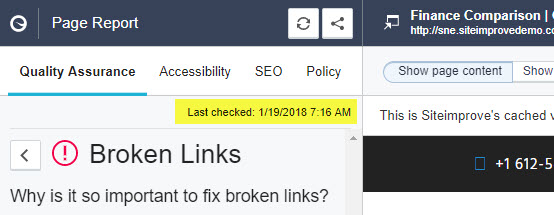
How does the Siteimprove crawler index pages based on URL?
When adding a new site to your Siteimprove account, please note that our crawler will index pages based on the trailing slash furthest to the right in the index URL.
For example: If one were to add https://www.abc.com/123 then our crawler will index and report on any page it encounters that matches https://www.abc.com since there is no trailing slash after the "123" directory.
This may lead to our crawler indexing far too many pages outside of the intended scope.
In order to keep the crawler from indexing too many pages, adding the site as https://www.abc.com/123/ will result in our crawler only indexing pages within the /123/ directory since there is a trailing slash following it.
Key Concepts
- Crawl frequency logic
- Scheduling visibility and delays
- Indexing rules and URL handling
Did you find it helpful? Yes No
Send feedback