Install the Siteimprove Sitecore On-premises Plugin
Summary
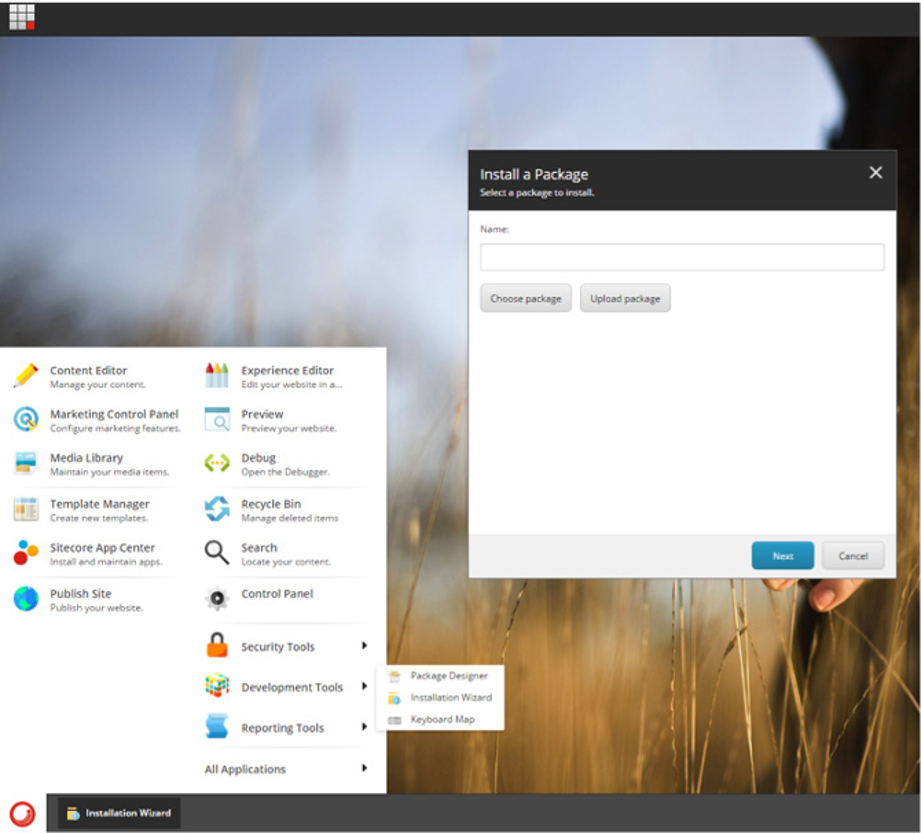
Download the Siteimprove Sitecore On-premises Plugin package from Sitecore CMS Plugin integration page. Back up Sitecore files and databases. Install the package using Sitecore Installation Wizard. Apply the Content Security Policy (CSP) web.config patch from the CSP Configuration section later in this doc. Proceed to the next section to review and set up Access Control and Roles.
Environment / Applicability
- Siteimprove Sitecore On-premises CMS Plugin
- Sitecore Installation Wizard
- Content Security Policy (CSP) web.config patch
Steps
- Download the Siteimprove Sitecore On-premises Plugin package from Sitecore CMS Plugin integration page.
- Back up Sitecore files and databases.
- Install the package using Sitecore Installation Wizard.
- Apply the Content Security Policy (CSP) web.config patch from the CSP Configuration section doc: Configure CSP and Network Allowlisting for Sitecore.
- Proceed to the next section to review and set up Access Control and Roles.
Related Articles
Did you find it helpful? Yes No
Send feedbackSorry we couldn't be helpful. Help us improve this article with your feedback.