Grant User Access to the Siteimprove Sitecore On-premises Plugin
Answer
The Siteimprove Sitecore On-premises Plugin installs the Sitecore/Siteimprove Manager role. Users must be members of this role to access Siteimprove ribbon commands and overlay actions. Sitecore administrators already have full access by default.
Before You Begin
Ensure the Siteimprove Sitecore On-premises Plugin has already been installed in your Sitecore environment.
Environment / Applicability
- Plugin .NET Framework compatibility
- Sitecore .NET Framework compatibility table for Sitecore XP 9.0 and later (Source)
- Active Siteimprove account
- Target site already crawled in Siteimprove
Grant Access to Users
- Open Sitecore Role Manager.

- Select sitecore/Siteimprove Manager.

- Click on Members button in the ribbon.
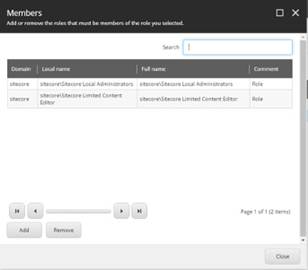
- Click on Add button to get the list of Users and Roles.
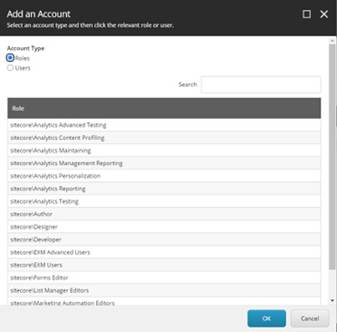
- Use the search field to find the user account or role that needs to be added to this role.
Access Control and Roles
The plugin installs role “sitecore/Siteimprove Manager.”
Users not in this role do not get access to Siteimprove ribbon commands and overlay actions.
“sitecore/Sitecore Local Administrators” and users with “IsAdministrator” attribute have full access by default.
As part of Sitecore's default behavior, a role can be added to another role. Add any existing role to the Siteimprove Manager role to grant access to all users in that role.
Result
Users added to the sitecore/Siteimprove Manager role can access Siteimprove ribbon commands and overlay actions within Sitecore.
Related Articles
Did you find it helpful? Yes No
Send feedback