Key Analytics Concepts and Distinctions
Summary
Default settings apply only to sites added in the future, while existing sites must be configured under Specific sites. Standard bot exclusion filters recognized bot traffic moving forward, whereas organization exclusions can remove matching traffic from historical and future reports.
A. Default Settings vs. Specific Sites Configuration
When navigating to Analytics > Settings > Tracking > Data exclusion settings, there are two separate tabs: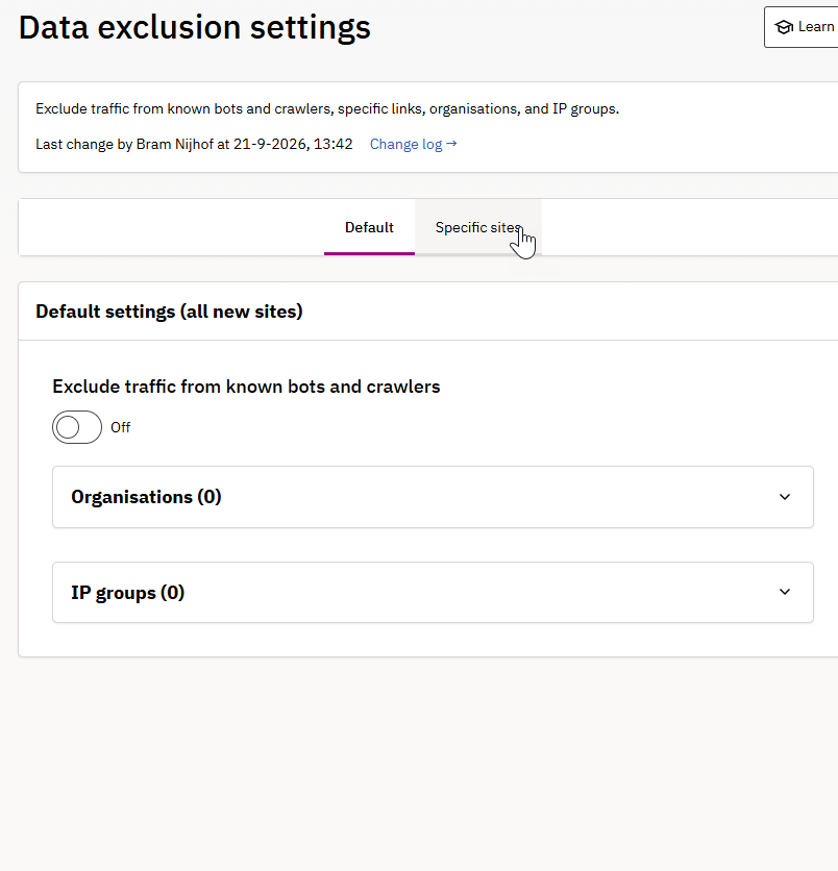
- Default (Default settings – all new sites)
- Scope & Behavior: Serves as a template that will only apply to sites created or added in the future.
- Application: Does not protect or update existing sites.
- Specific sites
- Scope & Behavior: Displays all currently active sites in your account. Rules must be enabled or customized site-by-site.
- Application: Required for existing sites to enable bot filters, IP group exclusions, or organization exclusions.
Important: Enabling rules on the Default tab will not resolve surges on currently active sites.
You must apply the rules under the Specific sites tab.
B. Standard Bot Exclusion vs. Excluding Organizations
- Exclude Bot Traffic (Toggle)
- How it works: Uses the industry-standard IAB/ABC International Spiders and Bots List alongside recognized AI crawler signatures (e.g., ChatGPT, ClaudeBot, PerplexityBot, DeepSeek). Filters matching requests at ingestion.
- Retroactive? No. Applies to incoming traffic moving forward.
- Exclude Organizations
- How it works: Blocks traffic matching specific data center or corporate network names (e.g., Meta Platforms Ireland Limited or hosting providers).
- Retroactive? Yes. Excludes matching traffic from historical reports and future reporting.
Related articles
Did you find it helpful? Yes No
Send feedbackSorry we couldn't be helpful. Help us improve this article with your feedback.