Exclude Organizations Associated with Scrapers
Summary
To remove scraper traffic associated with a known data center or corporate network, add the exact organization name as an exclusion for the affected site under Specific sites.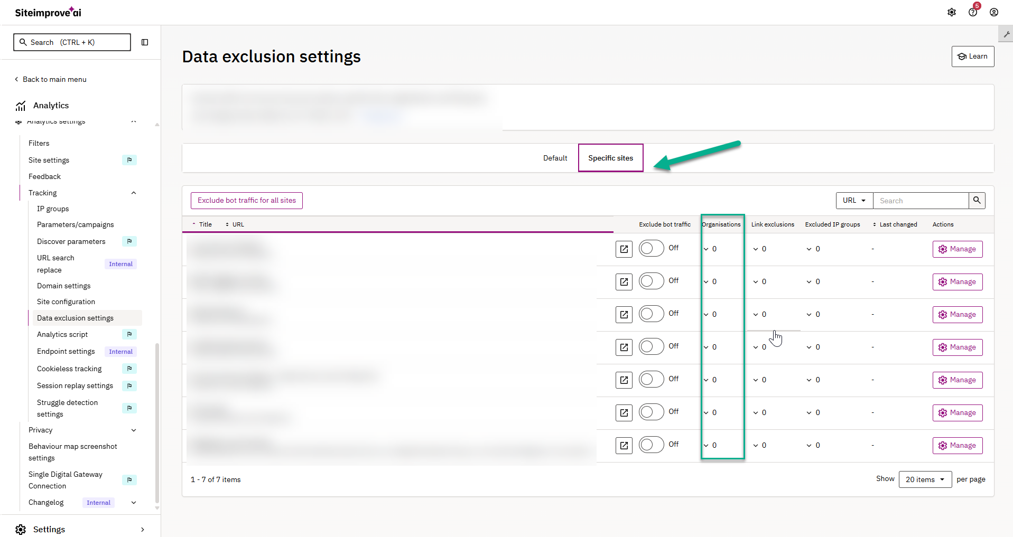
- Under the Specific sites tab, locate the site experiencing the surge.
- Click the number under the Organisations column (or click Manage in the Actions column).
- Switch to the Organisations tab and click Add organisation.
- Configure the exclusion:
- Match type: Select Equals or Contains.
- Organisation name: Enter the exact network name (e.g., Meta Platforms Ireland Limited or China United Network Communications Corporation Limited).
- Notes (optional): Add reference details (e.g., AI crawler or scraper exclusion).
- Click Apply.
Related articles
Did you find it helpful? Yes No
Send feedbackSorry we couldn't be helpful. Help us improve this article with your feedback.