Create and Configure a Policy from Scratch
Summary
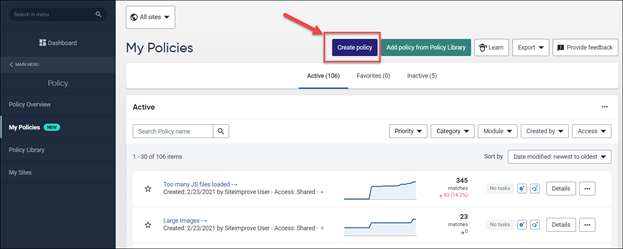
To create a policy from scratch, go to My Policies > Create policy, select a category, and add one or more rules.
Overview
This article explains how to create a policy from scratch and configure its two main elements: Categories and Rules.
When you create a policy, you will see that it consists of two main elements: Category and Rules.
A policy can consist of one or more rules.
Create a Policy from Scratch
If the first three options don’t meet your needs:
- Click My Policies > Create policy.
- Configure the policy using Categories and Rules.
Configure Your Policy
Category
Here you select if a policy relates to general content on the site, or if it is specific to document or media files.
Rules
Once a category has been selected, you can add rules to the policy. Rules are the building blocks you can use to assure that the content of each page matches your website’s standards.
A policy can consist of one or more rules.
Related Articles
Did you find it helpful? Yes No
Send feedback