IP Anonymization in Siteimprove Analytics
Summary
IP anonymization removes stored visitor IP addresses by replacing them with masked values, which protects personal data but limits filtering, segmentation, and IP-based identification in Analytics.
Overview
When a web analytics provider tracks visitor data from your website it collects visitors' IP addresses.
User IP addresses can be considered as personal data. Anonymizing visitors’ IP addresses is a legal requirement in some countries and can be used as one part of protecting personal data under Data Privacy regulations (e.g. GDPR).
In Siteimprove Analytics, you can configure IP addresses anonymization of visitors to your websites under Visitor Privacy in settings. Read more in the Settings: IP Address Anonymization and Do Not Track article.
What happens when I anonymize IP addresses?
IP address storage behavior
- If you decide to anonymize IP addresses, Siteimprove will discard the IP addresses and in their place store and present blank data in the form of xxx.xxx.xxx.xxx.
- Once IP anonymization is turned on Siteimprove no longer has access to this data. It is not possible for Siteimprove to recreate these IP addresses.
Loss of IP-based identification
- Siteimprove cannot create a connection between IP addresses and visitor data. You will not be able to filter/segment data based on IP addresses within Siteimprove Analytics. Therefore, it will not be possible to differentiate between external website visitors and visitors from your own organization based on IP addresses.
Anonymization delay
- Once enabled there is a 72-hour delay before IP addresses are anonymized. This allows you to reverse your changes during that period if necessary.
Impact on historical data
- Any changes to IPs in Data exclusion settings after enabling anonymization cannot be retroactively applied to historical visitor data after IP anonymization is enabled.
Organization-based segmentation availability
It will, however, be possible to segment visitor data by organization using filters. Learn more about how to filter data by organizations.
How can we determine the visitor's organization and location if IP anonymization is enabled?
If IP Anonymization is enabled, we do not store visitor IP addresses in our databases. We do carry out some analysis to determine the organization behind the IP and geo-location details before the data is sent to the database. This means organizations and locations can still be displayed in our platform without saving IP addresses.
Excluding traffic from certain IP addresses before anonymization
Purpose of excluding IP traffic
It is possible to exclude traffic from certain IP addresses before anonymization is enabled. So for example, you can anonymize IP addresses but still exclude internal employee traffic from Analytics, i.e. traffic from internal sources will not be recorded in Analytics.
Where to configure IP exclusions
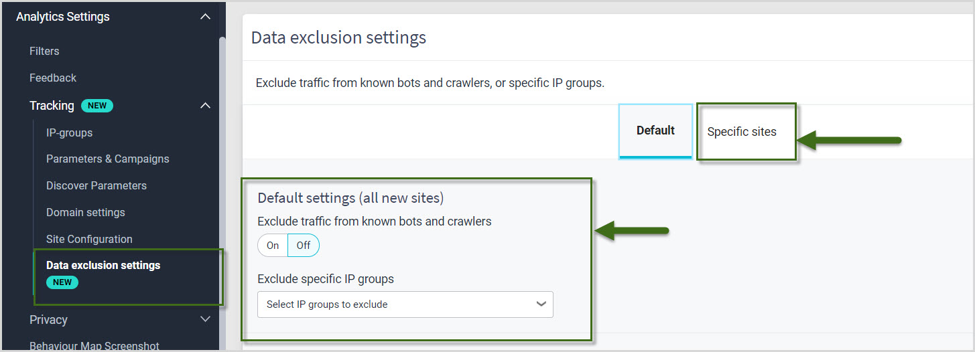
- Go to Analytics > Analytics Setting > Tracking > Data Exclusion Settings
How IP group exclusions work
Here you have the option to exclude traffic based on specific IP groups using the Exclude specific IP groups dropdown. You can find out more about creating IP groups in the article How to create an IP group for filtering in Analytics.
Adding IP exclusions after anonymization
It is possible to add new IPs for exclusion after IP anonymization has been enabled. In this case, you can either edit the current group of excluded IPs or create a new "IP groups" and add it to the "Data exclusion settings".
Related article
Also see this related article: How to exclude crawler traffic from Analytics.
Did you find it helpful? Yes No
Send feedback