What is a scroll map and what can I use it for?
Answer
A Scroll Map in Siteimprove Analytics shows how far visitors scroll on a webpage using color gradients to indicate engagement levels, helping you understand where users lose interest and how to optimize content placement.
Overview
This article explains what a Scroll Map is, how it works, and how it helps you evaluate user engagement and improve content placement on your webpages.
Definition
The Scroll map is a Siteimprove Analytics Behavior map feature found at Analytics > Behavior > Behavior maps.
See also “What is a Behavior Map and how do I add one?”
With Scroll Map you can see exactly how far visitors are willing to scroll to find what they are looking for on your page.
How it works
The Scroll Map contains color gradients similar to the Heatmap.
Visitor attention is measured from lowest to highest (from dark to bright colors).
Rather than mapping heat spots, like the Heatmap, the Scroll Map evaluates the horizontal lines on a webpage.
The screenshot above shows where on the page visitors pay most attention.
In this case, the lighter colors (e.g. yellow) show more activity and the darker colors (e.g. blue) indicate less activity.
Note: The tracking starts as soon as the visitor scrolls down the page, this is why the area just below the top of the page is typically lighter.
What you can use it for
The Scroll Map is especially useful for evaluating pages with long pieces of information, such as articles.
It will help you uncover whether or not your visitors scroll all the way to the end of the page.
With this knowledge, you can make informed decisions where to place the most business-critical information on your page.
It also helps you prioritize web editing resources.
If the majority of your visitors do not scroll at all on your home page perhaps you should not spend a lot of time updating the content that is placed all the way down by the footer of the page.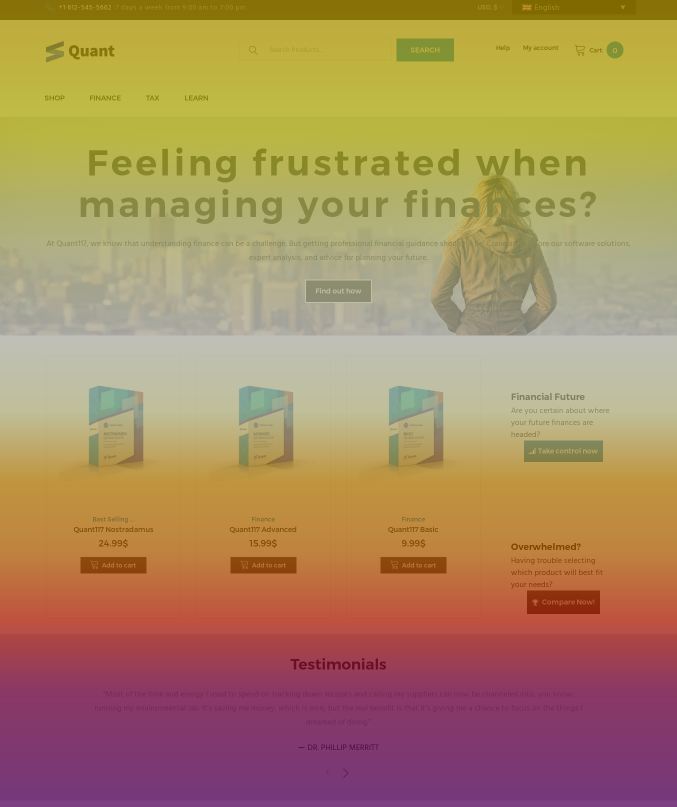
Note: The tracking starts as soon as the visitor scrolls down the page, this is why the area just below the top of the page is typically lighter.
Additional resources
Did you find it helpful? Yes No
Send feedback